Keychron Q1 Pro Review (2026): The Keyboard Enthusiasts Recommend to Everyone
The Keychron Q1 Pro hits the sweet spot between custom and convenient. Full review after 3 months of daily use.
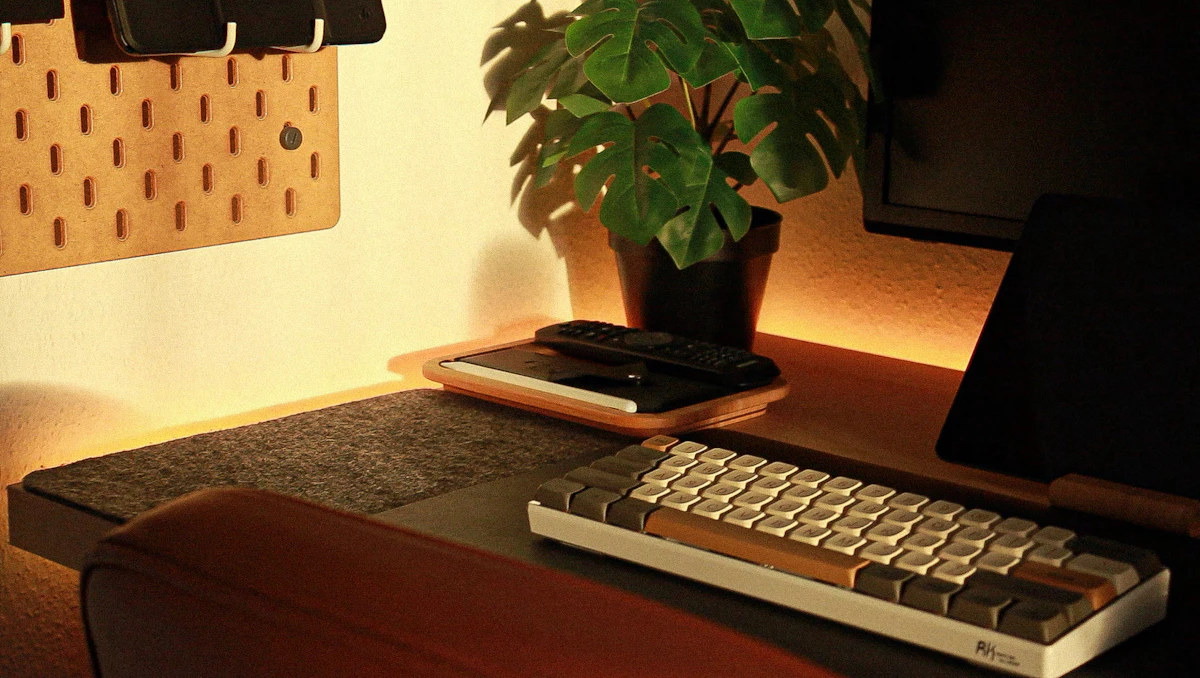
Three months in, the Keychron Q1 Pro is still the keyboard on my desk. Not because I haven't tried to replace it -- a steady rotation of review units keeps arriving -- but because nothing has given me a reason to.
That says more than any spec sheet. The Q1 Pro is the keyboard I recommend when someone asks "what should I get?" without wanting a 45-minute lecture on switches and mounting systems.
SolderMag Take
The Q1 Pro exists in a sweet spot that didn't used to exist: full aluminum construction, gasket mount, hot-swap, QMK/VIA, triple-mode wireless, and a rotary knob -- all for around $170. Two years ago, that feature set cost $250+ from a group buy with a 6-month wait.
Keychron didn't invent any of this technology. What they did is package it into a product that works out of the box, ships from Amazon, and doesn't require you to join a Discord server to troubleshoot firmware. That's the real achievement.
Key specs at a glance
| Spec | Detail | |---|---| | Layout | 75% with rotary knob | | Case | CNC 6063 aluminum, 1.7kg | | Mount | Gasket (silicone) | | Switches | Keychron K Pro (hot-swap, MX compatible) | | Connectivity | Bluetooth 5.1, 2.4GHz, USB-C | | Battery | 4000mAh, 100+ hrs (backlight off) | | Firmware | QMK / VIA | | RGB | Per-key, south-facing LEDs | | Price | ~$170 |
What you get in the box
The Q1 Pro ships with the keyboard (fully assembled with switches and keycaps), a USB-C to USB-C cable, a USB-C to USB-A cable, a 2.4GHz wireless dongle, a switch puller, a keycap puller, a hex key for disassembly, and extra switches/keycaps. Keychron includes everything you need to start customizing immediately, which is a nice touch at this price.
Specs and features deep dive
Layout and build: 75% layout with a rotary encoder knob in the top right. Full CNC-machined 6063 aluminum case at roughly 1.7kg. The weight is reassuring -- this keyboard does not move on your desk.
Mounting system: Gasket mount with silicone gaskets between the plate and case. This creates a slight flex when typing that softens bottom-out without feeling mushy. It's a noticeable improvement over tray-mount keyboards, especially during sustained typing sessions.
Switches: Ships with Keychron K Pro switches (available in Red, Brown, or Banana). The K Pro Browns are a reasonable starting point -- a mild tactile bump with moderate pre-travel. They're not endgame switches, but they're solid enough that you won't feel urgency to swap them immediately.
Hot-swap sockets: Full hot-swap with south-facing RGB LEDs. Compatible with any 3-pin or 5-pin MX-style switch. Swapping switches takes under 20 minutes for the full board with a basic switch puller.
Wireless: Bluetooth 5.1 (connects to 3 devices) plus 2.4GHz dongle. Latency on 2.4GHz is imperceptible for typing and acceptable for casual gaming. Bluetooth range is solid through one wall.
Battery: 4000mAh internal battery. Keychron claims 100+ hours with backlighting off, and our experience matches. With moderate RGB, expect 30-40 hours between charges. USB-C charging.
Firmware: Full QMK and VIA support. Remap any key, create layers, set macros -- all through VIA's browser-based interface with no software install required.
Sound profile: Out of the box, the Q1 Pro sounds good but not exceptional. There's a slight metallic ping on harder keystrokes that the case foam partially dampens. Adding a PE foam sheet between the PCB and plate (a $5 mod) eliminates it and makes the board sound genuinely premium.
Daily use: three months in
Typing feel: The gasket mount makes sustained typing sessions noticeably more comfortable than tray-mount boards. There's a subtle give on each keystroke that reduces fatigue during long writing sessions. The aluminum case adds a satisfying solidity -- keystrokes feel deliberate, not hollow.
Wireless reliability: Bluetooth switching between a MacBook and a Windows desktop has been flawless. The 2.4GHz connection has never dropped during gaming sessions. Wake-from-sleep is near-instant on 2.4GHz; Bluetooth takes 1-2 seconds, which is normal.
Knob usage: The rotary knob defaults to volume control, which is where most people leave it. Through VIA, you can remap it per-layer -- I use it for scrolling in the browser and timeline scrubbing in video editors. It's a small feature that becomes indispensable.
Durability: After three months of heavy daily use, the aluminum case shows zero wear. The anodized finish resists fingerprints well. The stabilizers haven't developed rattle, which is a common complaint on boards at this price point over time.
Pros and cons
Pros:
- Full aluminum gasket-mount build at $170 is exceptional value
- QMK/VIA support means total key remapping without proprietary software
- Triple-mode wireless (Bluetooth + 2.4GHz + USB-C) covers every scenario
- Hot-swap sockets make switch experimentation painless
- Rotary knob is tactile and customizable
- 100+ hour battery life with backlight off
Cons:
- Stock keycaps are PBT but feel thin -- a $30-40 keycap upgrade makes a real difference
- Weighs 1.7kg, not portable for daily bag carry
- Metallic ping on stock configuration (fixable with basic foam mod)
- 2.4GHz dongle is USB-A, requires an adapter for USB-C-only laptops
- No carrying case included despite the premium price point
Who the Q1 Pro is for
Developers and writers who spend 6+ hours typing daily and want something that feels substantially better than a standard keyboard without falling down the custom keyboard rabbit hole.
First-time mechanical keyboard buyers with a ~$170 budget who want to buy once and not regret it. The hot-swap sockets and QMK support mean you can evolve your preferences without buying a new board.
Remote workers who switch between a personal machine and a work laptop. The triple-mode wireless with 3-device Bluetooth makes switching seamless.
Anyone upgrading from a $50-80 mechanical keyboard who wants to understand what "premium" actually means in keyboard terms. The gasket mount and aluminum body are immediately noticeable.
Q1 Pro vs the competition
vs NuPhy Air75 V2 (~$110): The Air75 V2 is half the weight and low-profile, making it better for travel and laptop pairing. But the Q1 Pro's full-height switches, aluminum build, and gasket mount deliver a superior typing feel for desk use. If portability matters, NuPhy wins. If typing experience matters, Q1 Pro wins.
vs Keychron Q1 Max (~$200): The Q1 Max adds a small screen and slightly refined stabilizers. The practical difference is minimal for most users. Save the $30 unless the screen display appeals to you.
vs Keychron C3 Pro (~$35-40): The C3 Pro is the value play -- QMK/VIA, hot-swap, decent typing feel at a quarter of the price. But it's wired-only, plastic, and the typing experience gap is immediately noticeable when you A/B them. The Q1 Pro justifies the premium for daily use.
Who should skip it
Gamers who need the lowest possible latency. The Q1 Pro is fine for casual gaming, but competitive FPS players should look at wired hall-effect boards like the Wooting 80HE.
Frequent travelers. At 1.7kg, this is a desk keyboard. If you need portability, the NuPhy Air75 V2 is half the weight.
Budget-conscious buyers. If $170 is a stretch, the Keychron C3 Pro delivers 80% of the experience at $35-40. It's wired and plastic, but the typing feel punches way above its price.
People who need a numpad. The 75% layout drops the number pad. If you do data entry or heavy spreadsheet work, look at full-size options.
 Editor's Choice
Keychron Q1 Pro Wireless Mechanical Keyboard
Verdict
The Keychron Q1 Pro is not the most exciting keyboard in 2026. It doesn't have hall-effect switches or an OLED screen or AI-powered anything. What it has is a relentlessly practical feature set executed at a quality level that used to cost twice as much.
After three months, I've stopped thinking about keyboards. That's the highest compliment a keyboard can earn.
Rating: 9/10 -- The best keyboard for most people who care about keyboards.
How long will it last?
Keychron's hot-swap sockets are rated for thousands of swap cycles. The Gateron switches are rated for 50 million keystrokes. QMK firmware means you'll never be abandoned by proprietary software. The aluminum case won't crack or flex.
Realistically, this keyboard will outlast your desire to keep it. The most likely reason you'll replace it isn't failure -- it's that you'll want to try something new after a year or two. And when that happens, the Q1 Pro holds resale value well because the enthusiast market knows what it is.
Decision checklist
- Do you type for more than 4 hours daily? The Q1 Pro's build quality pays off over long sessions.
- Is $170 within your keyboard budget? If not, the Keychron C3 Pro at $35-40 is the smart alternative.
- Do you need wireless? If wired is fine, you can save money elsewhere, but the Q1 Pro's wireless is genuinely reliable.
- Are you ready for 1.7kg on your desk? It won't move, but it also won't travel.
- Do you want to experiment with switches later? Hot-swap makes this a platform, not a locked-in purchase.
Recommended upgrades (in order of impact)
- Keycaps ($30-40): A doubleshot PBT keycap set is the single best upgrade. The stock caps are functional but thin -- aftermarket caps improve sound, feel, and appearance.
- PE foam mod ($5): A sheet of PE foam between the PCB and plate eliminates the metallic ping and adds a deeper, thockier sound signature.
- Premium switches ($25-50): Gateron Oil King V2 (linear) or Boba U4T (tactile) are popular upgrades. Hot-swap makes this a 20-minute job.
- Coiled cable ($20-30): Purely aesthetic, but a coiled aviator cable completes the look if you're using it wired at a desk.
Sources
- Keychron Q1 Pro technical specifications: https://www.keychron.com/products/keychron-q1-pro
- QMK firmware documentation and VIA compatibility listings
- Switch force curve data from Keychron K Pro datasheet
- Community sound tests and teardown reviews for build quality verification
For the full keyboard roundup including budget and gaming picks, see our best mechanical keyboards guide. If you're new to mechanical keyboards, our mechanical keyboard guide covers switches, layouts, and mods from scratch. And to round out your workspace, check our desk setup essentials for monitor arms, mice, and desk recommendations.