Best Surge Protectors & Power Strips (2026): The Ones That Don’t Lie When Lightning Hits
A power strip is cheap plastic until it’s the only thing between your gear and a spike. Here’s how to buy surge protection that’s actually engineered—plus the red flags.
Most people buy a power strip the same way they buy a USB cable: whatever’s cheap, whatever ships fastest.
That’s fine—until you plug in a $2,000 laptop + monitor + NAS and discover your “surge protector” is basically an extension cord with a comforting label.
This guide is the SolderMag version: practical, mildly paranoid, and focused on what survives the messy real world (brownouts, spikes, flaky wiring, thunderstorm season).
SolderMag Take: surge protectors are consumables with receipts
A surge protector isn’t a permanent safety charm. It’s a sacrificial part (usually MOVs—metal oxide varistors) that degrades a little every time it clamps a spike.
Two uncomfortable truths:
- “Protected” does not mean “indestructible.” A big hit can kill the strip and your stuff.
- The best surge protector is the one that fails safely and tells you it’s done.
So in 2026, I’d rather buy a slightly more expensive unit with clear status indicators, sane wiring, and proper certification than a bargain strip with 12 outlets and vibes.
What you’re actually shopping for (in plain English)
Power strip vs surge protector vs UPS
- Power strip: just more outlets. No surge components (or only “marketing” ones).
- Surge protector: adds a clamping network to reduce over-voltage spikes.
- UPS (battery backup): a surge protector plus a battery/inverter. It handles outages and often smooths brownouts.
If you’re protecting:
- Desktop PC / NAS / router: consider a UPS.
- Monitors / chargers / lamps: a good surge protector is usually enough.
Key specs that matter
You’ll see a lot of numbers. These are the ones worth caring about:
- Joules (energy rating): higher generally means more surge energy capacity. Not magic, but it’s a useful “how much sacrificial material is inside” proxy.
- Clamping voltage (let-through): lower can be better, but only when paired with legitimate testing and good design.
- Indicator lights that actually mean something: “Protected” and “Grounded” are the minimum.
- Response time: commonly marketed; in practice, design + certification matter more than a “1 ns” claim.
Certifications: the shopping filter that saves you hours
If you only remember one thing:
- Look for UL 1449 (surge protective devices) in the US context.
- In AU/NZ/EU contexts you’ll see different marks/standards; don’t fake certainty—look for real compliance documentation, not just a logo.
If the product page avoids naming the standard, treat it like a counterfeit microSD card.
The picks (2026)
Affiliate links aren’t live yet, and model numbers churn constantly—so instead of pretending one SKU rules forever, here are the categories that consistently test well and stay sane.
Best for a desk setup: 8–12 outlet surge protector with spaced outlets + real status lights
Why it wins:
- handles the “monitor brick + charger brick + audio interface” reality
- gives you a quick visual that it’s still protecting
What to look for:
- widely spaced outlets (or a mix of wide + standard)
- a 15A/1800W-class rating (US) or appropriate local rating
- a resettable breaker (not just a fuse you can’t replace)
- a longer cord if you’re routing cleanly (don’t strain the plug)
 Best overall
Anker 351 Power Strip Surge Protector
Best for sensitive gear: surge protector with coax/Ethernet protection (only if you need it)
This is niche, but worth it when it applies.
Buy this when:
- you have cable modem coax entering the room
- you have Ethernet runs to outdoor gear (PoE cameras, outdoor APs)
Caveat:
- inline coax/Ethernet protection can add failure points. If your network is purely indoor and short-run, skip it.
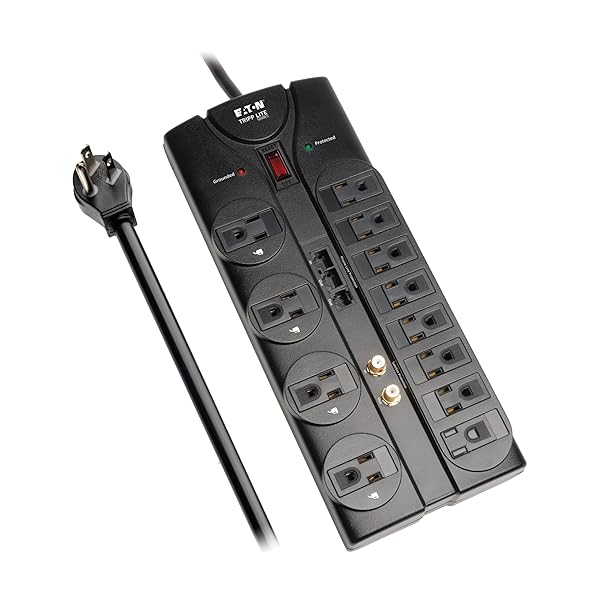 Best for home/office
Tripp Lite Protect It! 12-Outlet Surge Protector TLP1208SAT
Best for travel / minimal rigs: compact 4–6 outlet surge protector
Why:
- hotel wiring is a lottery
- you’re often charging many devices in one spot
Look for:
- a low-profile plug
- a sturdy strain relief
- outlets that don’t block each other
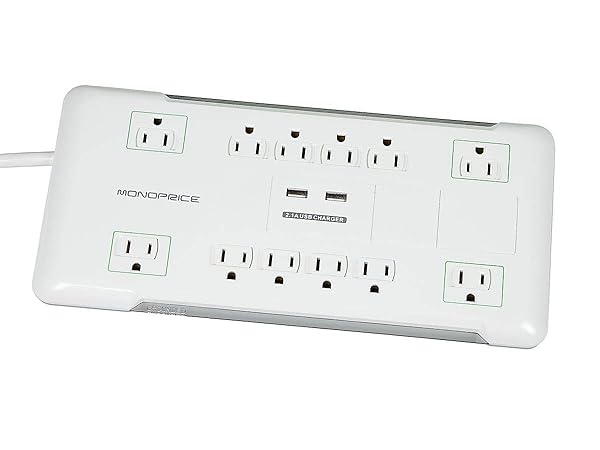 Best with USB
Monoprice 12 Outlet Power Surge Protector with 2 Built-in USB Charger Ports
Best for workshops: metal-bodied strip (and/or mounted strip), surge-rated
Workshop power is harsh: motors, compressors, cheap soldering stations, random inductive loads.
Look for:
- a metal housing
- mounting options
- a real switch that doesn’t feel like it came from a toy
 Best value
Belkin 12-Outlet Surge Protector BV112230-08
Quick buying checklist (use this in the aisle)
Before you buy, confirm:
- It’s explicitly a surge protector, not just a “power strip”
- It cites a real safety standard (e.g., UL 1449) and not just “certified”
- It has a Protected indicator (and preferably Grounded)
- The cord + plug feel overbuilt (strain relief matters)
- The outlets are spaced for modern bricks
- It has a breaker/reset (or at least clear overload protection)
Optional but nice:
- right-angle plug for tight spaces
- keyhole mounting for desks/workbenches
- USB charging only if it’s from a reputable brand (cheap onboard USB supplies are noisy)
Red flags (the stuff that makes me walk away)
- “Surge protector” with no joule rating anywhere
- “UL listed” claimed with no model number / no traceable paperwork
- A “Protected” light that only indicates power, not protection status
- Very thin cord on a high-outlet strip (heat + voltage drop + sadness)
- No strain relief where the cord enters the body
- “1200W max” on a strip marketed for PC/office (you’ll trip it constantly)
- Overpromising language like “lightning proof” or “guaranteed protection”
Reality check: what surge protectors can’t do
Surge protectors are good at reducing spikes, not rewriting physics.
They can’t reliably save equipment from:
- a direct/near-direct lightning strike into your building
- a neutral fault / wiring error upstream
- long duration over-voltage events (depends on design; this is where a UPS or whole-house SPD can matter)
If you live in an area with frequent storms or sketchy mains, the grown-up stack is:
- whole-home surge protective device (SPD) at the panel (electrician job)
- UPS for critical gear (modem/router/NAS/PC)
- point-of-use surge protector for everything else
Sources
- UL Solutions — UL 1449 overview (surge protective devices): https://www.ul.com/resources/ul-1449-surge-protective-devices
- NIST — Surges and surge protection (plain-language guidance): https://www.nist.gov/
- Electrical Safety Foundation International (ESFI) — surge protection & power strip safety: https://www.esfi.org/
If you’re powering a home-office stack, this pairs well with our USB-C charging guides—because “protected” mains power doesn’t help if the charger is junk.